PC hardware monitoring · Local · Customizable · Open · Free

Your PC's vitals.
On any screen you own.

MoBro is a free app that puts all your PC's hardware metrics — plus weather, crypto prices, news and more — on a live dashboard.
Keep it in a window on your main monitor, or send it to a spare screen, your phone, a tablet, a Raspberry Pi or anything that has a browser.

Everything streamed locally over your own network — no cloud, no data leaving your PC.

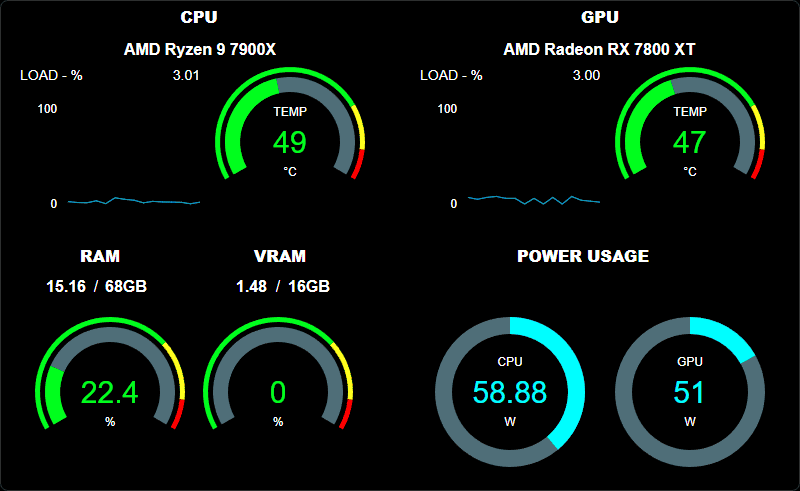
A MoBro dashboard showing live CPU and GPU temperature, load, RAM usage and power draw
  • Runs on: Windows 10 & 11 (64-bit)
  • Displays on: screen · phone · tablet · browser · Raspberry Pi
Download MoBro

v1.6.0 · ~158 MB · Windows 10 & 11 (64-bit)

Free tier: 1 dashboard, 25 live metrics, no account, no expiry.
See what the paid tiers add →

  • 28,000+ community layout installs
  • 75 marketplace add-ons
  • SDKs open-source on GitHub
  • Built and hosted in the EU

Three steps. About five minutes.

  1. Install MoBro

    One installer on your Windows PC. Free, no account, nothing to sign up for.

  2. Pick a layout

    Use one of the default layouts that ship with MoBro, install a community one, or drag your own together in the builder.

  3. Open it on any screen

    As a window on your PC, on a phone, Raspberry Pi or simply from the dashboard's URL in any browser.

    No cloud, no account, no port forwarding — the dashboard is served by your PC on your own network.

Read the full setup guide

Build it once, open it anywhere

A drag-and-drop builder, metrics from various sources and dashboards that reach your phone, a spare monitor, a Raspberry Pi or simply as a window on your primary monitor.

Bro tier+

One PC, every screen

If it has a screen and a browser, it can be a MoBro dashboard.

  • PC displays and external monitors
  • Any phone or tablet - iOS or Android, no app store install
  • Old laptops, e-readers, smart TVs, spare tablets - anything with a browser
  • Multiple simultaneous dashboards from one MoBro instance - 1 on the free tier, unlimited on Mega Bro
Raspberry Pi

Turn a spare Pi and a 7-inch panel into a permanent sensor display.

  • Preconfigured Raspberry Pi image — flash it with Raspberry Pi Imager and boot
  • Runs on the Raspberry Pi 4 and earlier, including the Pi Zero 2 W — Pi 5 support is in the works
  • Works with the official 7" touch display and most common DSI/HDMI panels
  • Boots straight into your dashboard — no keyboard, no login
Set up Raspberry Pi

Build it the way you like it

Drag a widget in, point it at a sensor, restyle it. No config files, no scripting.

  • Drag & drop widget placement with snap-to-grid and pixel-exact positioning
  • Choose metrics from multiple sources
  • Live preview with real sensor data while you build
  • Any resolution — build for a 480×320 panel or a 4K monitor
  • Match your style with extensive customization options
Bro tier+

Tap it to control your PC

Turn any widget into a button. Launch Steam, skip a track or run a script — from your phone, without touching the keyboard.

  • Launch applications right from the dashboard
  • Media controls: play, pause, next/previous, volume
  • Open URLs with a single tap
  • Invoke local scripts or commands

Actions start with the Bro tier (3€/month via Patreon) — the free tier covers everything else on this page.

Extensible by design

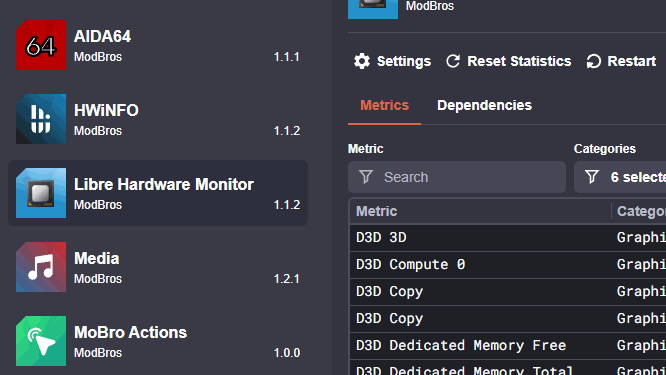
Unlock even more possibilities with our ever-growing ecosystem

Open source where it counts: the plugin and widget-pack SDKs + most plugins and widget packs we ship are fully open-source on GitHub.

Join the community

MoBro is built by us, but shaped by the people using it — lots of the awesome layouts but also widget packs and plugins in the marketplace come from the community.

Facing a problem, need to ask a question or just want to connect with fellow community members? Discord is where that happens.

MoBro is funded entirely by its Patreon supporters — no ads, no data sales.

A PC build running a MoBro dashboard

Privacy First

MoBro values your data and privacy and follows a local-first approach.

Your dashboard is served by your PC, on your network. Your sensor data never touches our servers.

  • Metrics stay on your machine
  • Zero third-party data sharing
  • No account for the free tier
  • GDPR compliant
  • Developed & hosted in the EU

The SDKs and most of our plugins & widget packs are open source —read the code.

To read your sensors, MoBro installs PawnIO, a small open-source, signed kernel driver the hardware-monitor plugins rely on.

Ready for your first dashboard?

Download MoBro and start building today!

Download MoBro

v1.6.0 · ~158 MB · Windows 10 & 11 (64-bit)

Free tier: 1 dashboard, 25 live metrics, no account, no expiry.

  • Free forever
  • Windows 10 & 11 (64-bit)
  • No account required
  • Up and running in minutes

Not ready yet? Join the Discord and see what people are building →